You can view the DFL case studies and FAQs here so that you can understand how to use the DFL data recovery tools better

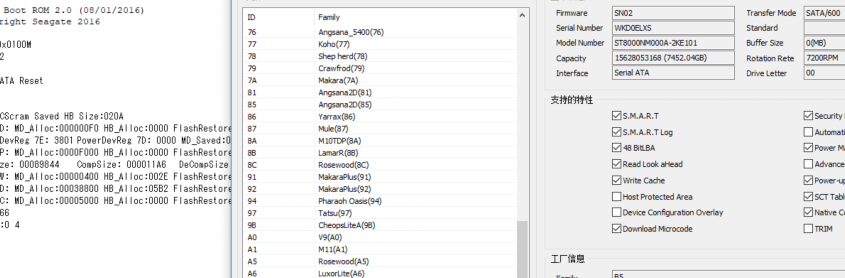
Dolphin Data Lab has upgraded the Seagate HDD repair and data recovery solution and for all Dolphin DFL users, they can get the latest DFL Seagate hdd repair software from the user-only forum and repair and recover lost data effectively from the Seagate New ST8000NM000A 8TB B5 Cimarron family hard drives.

F3 T>^l
Cimarron.SATA.Combo.Default5xxE.MynaPlus2.1.Cust.KB1A
Product FamilyId: B5, MemberId: 01
HDA SN: WKD0ELXS, RPM: 7202, Wedges: 1A0, Heads: A, OrigHeads: C, ActiveHdMap: 03FF, Lbas: 000074795956, PreampType: 82 50
Bits/Symbol: C, Symbols/UserSector: CC9, Symbols/SystemSector: CC8 HostBlocks: 0x8, HostSectorSize: 0x200, SystemSectorSize: 0x1000
PCBA SN: 0000E03782WB, Controller: MYNAPLUS_2_0_SATA(1D20), Channel: Unknown, PowerAsic: Unknown Rev 00, BufferBytes: 10000000
SF ID: 9D 70, SF Part Size: 800, Flash Used: 3C0
Package Version: CRAEA1A06.SDN1.AB0462.SN02 , Package P/N: 100864930, Package Global ID: 00699153,
Package Build Date: 01/21/2020, Package Build Time: 13:26:54, Package CFW Version: CRAEA1A06.SDN1.AB0462.01847935.00699153.SN02 ,
Package SFW1 Version: B632, Package SFW2 Version: D632, Package SFW3 Version: —-, Package SFW4 Version: —-
Controller FW Rev: 01211326, CustomerRel: SN02, Changelist: 01847935, ProdType: CRAEA1A.SDN1QC, Date: 01/21/2020, Time: 132654, UserId: 00699153
Servo FW Rev: D632
Parallelism Identity: Single
TCG IV Version: n/a
Package BPN: 161
RAP FW Implementation Key: 22, Format Rev: 0003, Contents Rev: 01 13 C0 2F
Active BFW Container: 1
4K Sys Area: 1
TOTAL TTR = 00004F5F
Features:
– IOEDC enabled
– IOECC enabled
– DERP enabled v. 7.0.00.0000000000000000
– LTTC-UDR2 compiled off
– SuperParity 2.5 enabled
– Humidity Sensor enabled
– Media Cache Partition enabled
– Torn Write Protection enabled
– SweepSeek 2.0
– SubRelease:0
– Critical Event Log v. 1
– FAFH 42.4 enabled
– EWP:1
– DRAM Mirror:1
– MiniZones Serpentine Media Layout

By the DFL Seagate HDD repair tool, users can easily unlock the firmware area, backup the important firmware modules, fix the damaged firmware modules and then recover the lost data with DFL DDP data recovery hardware tools.

Any question is welcome to sales@dolphindatalab.com or add Dolphin Skype ID: dolphin.data.lab
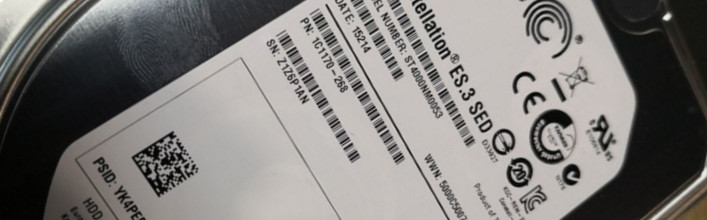
How to Repair ST4000NM0053 Hard Disk not Detected-Seagate Constellation ES.3 SED?
How to recover data from ST4000NM0053 hard disk which is not working?
How to Recover Data from a Hard Drive that Won’t Boot?

When trying to get the data off the patient drives, it’s always necessary to treat the patient carefully and correctly. Users must understand the failure of the patient drive and use the right hdd repair and data recovery solutions.

This article is to introduce the steps on how to repair firmware failure and get lost data from Seagate ST4000NM0053 Constellation ES.3 SED drive.

Failure Symptoms:

Not detected
Firmware Locked>The module list is empty
Cannot enter F3 T>

HDD repair and recovery steps:

HDD repair tool used: DFL Seagate HDD Repair Tool for fixing ST4000NM0053 Constellation ES.3 SED drive

Backup ROM;
Generate unlock rom;
Write unlock rom;
Power off and on HDD;
send unlock key

CTRL+Z to enter F3 T>

Exit program

Re-enter program

Module list is available

Try to backup firmware modules or execute commands but failed

Next

HDD busy and power restart auto

Click stop and then power off and on

Send unlock key

Common Functions>Common Repair>Unlock Diag Mode

Log window shows: Operation Success

Try to backup important SYS files again and log window shows success

Next users can enter F3 T> and start firmware repair

After firmware repair, users can enter use DFL-DDP data recovery tool to extract the lost file directly or image the patient HDD.

Any question is welcome to sales@dolphindatalab.com or add Dolphin Skype ID: dolphin.data.lab
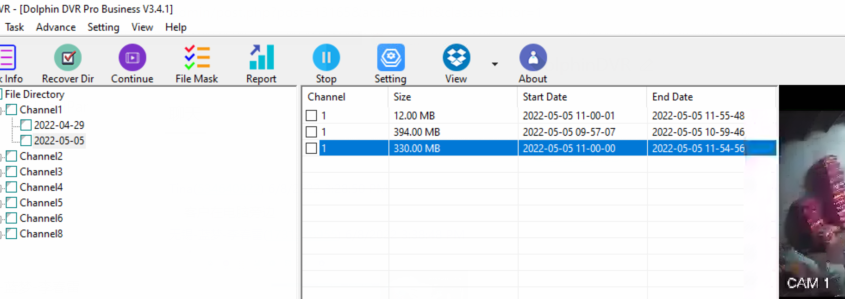
This DaHua DVR data recovery case study was for one DFL user from India. This is one formatted Dahua DVR hdd and the Indian user has used other CCTV DVR data recovery tools to scan the patient DVR hdd but get nothing or get videos with only 2MB, they are just some small video fragmented files.

When the user received this DVR patient HDD, the DVR brand is unknown. No one told the users about the DVR brand and then the user contacted Dolphin team for remote technique support.

Dolphin engineer checked the hex data of the DVR patient HDD and analyzed the data carefully and found out the dvr brand is DaHua DVR.

The patient DVR hdd was formatted and the file system info was overwritten and for this kind of DaHua DVR video recovery cases, users need to select ‘Deep Analysis’ within the Dolphin DVR recovery software and start the video fragments analysis, collection and restruction and finally all lost videos will be listed properly.

With the help of Dolphin engineers, the Indian client had got all his lost videos back.

Any question is welcome to sales@dolphindatalab.com or add Dolphin Skype iD: dolphin.data.lab

Western Digital SMR HDD firmware repair and data recovery cases are more and more common for data recovery engineers worldwide.

Among all cases, the most common cases are the following two types:

1, Firmware module 190 failure;
2, Physical head damage.

As for module 190 failure, it has the following situations:

Module 190 is good but couldn’t be loaded to ram properly;
Module 190 is corruped due to bad sectors within the module LBA range or overlap nodes or vacant nodes or error nodes generated;

As for Physical head damage, users need to swap heads to continue and can try head and platter swap tools here.

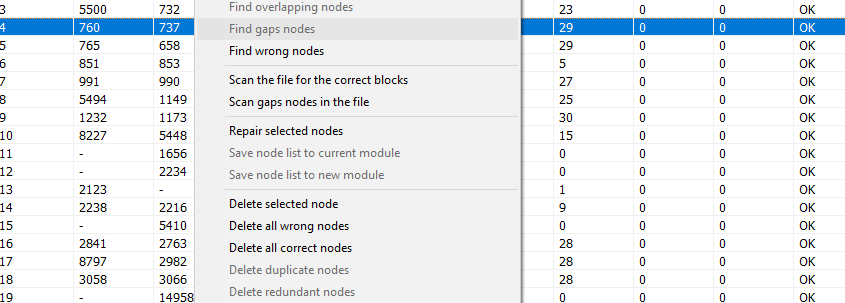
To ensure users can get the best WD SMR hdd data recovery success rate, Dolphin team have added the unique WD SMR HDD Firmware module 190 manager with the following detailed functions:

Import Module 190 and Manage
Extract the T2 Data(190 core nodes)
Original Nodes List
Scanned Nodes List
List Nodes by Original Order
List Nodes by Node Tree
List Nodes by Start LBA
SIT Repair
Search Correct Blocks Auto
Search and Replace
Search Error Nodes
Search Overlap Nodes
TIS Check
Vacant Nodes Count
Overlap Nodes Count
Tree Root Node Number Check
Test Current Nodes
Test All Nodes
Test Tree
Test Nodes by SMRZONE
Scan Lost Nodes
Repair Selected Nodes
Delete Selected Nodes
Delete Error Nodes
Delete Nodes with Same Start LBA
Delete Nodes with Same END LBA
Repair Vacant Nodes with Scanned Nodes
Caculate Valid Data from Selected Nodes
Zerofill Bad Sectors within The Module
Load 190/T2 auto for data recovery

Users can get above solutions within DFL-DDP data recovery tool.

Any question is welcome to sales【@】dolphindatalab.com

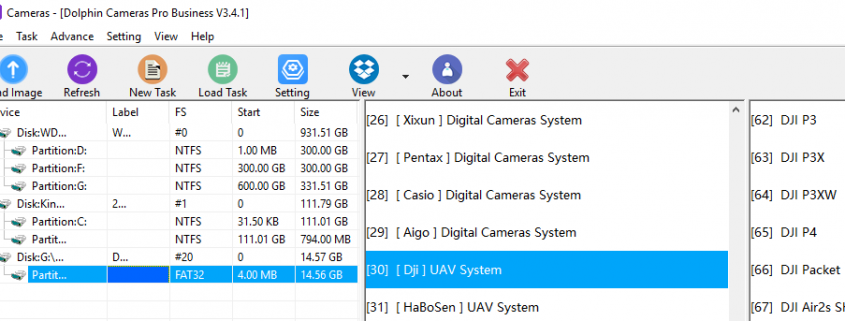
Dolphin CCTV DVR data recovery software supports very successful video data recovery from DJI UAV video recording systems.

The following is the detailed support list:

DJI P3
DJI P3X
DJI P3XW
DJI P4
DJI Packet
DJI Air2s Short
DJI Air2s Long
DJI OSMO ACTIOR

Other DJI UAV models…

If the DJI model is listed, it is very easy to select the model, use fast analysis or deep analysis to get the lost videos easily. If the DJI model is not listed, for example, users get new brands of DJI UAV video recorders, users can still use Dolphin DVR unique video recovery solution, select unknown video recorder, extract sample videos, add sample videos and then use deep analysis to recover all lost/deleted videos.

Users can check how to use Dolphin DVR to recover lost deleted videos from different video recorders.

Please note: Dolphin DVR has one-week version, full version or customized version, users can email to us for details.

Dolphin CCTV DVR data recovery software is all-in-one video recovery solution containing four software modules: CCTV DVR recovery module, digital camera recovery module, video recorder recovery module and video repair module.

Any question is welcome to sales@dolphindatalab.com or add Dolphin Skype ID: dolphin.data.lab
This is one successful data recovery case study for one Dolphin user from Mexico who is using DFL PCIe data recovery express.recharge version.

Patient HDD ID:

Model : ST2000LM010-1RA174
Family: Rosewood A5
Serial : ZDZBNJP7
Firmware : SDM1
Capacity : 3907029168 (1863.02GB)
Sector size : 4096
Heads number : 4

FW info : Obtained
FW version : RT0898.SDM1.CC0801.SDM1
FW package P/N : 100854747
FW ID : 00410701
FW creation date : 2019/05/26
FW creation time : 20:32:04
CFW version : RT08.SDM1.01556940.00410701
SFW1 version : 8975

Modules list : Obtained
Modules number : 55

Failure Symptoms:
Long time to get ready
Many LBA read error in COM terminal
Data area is not accessed

Due to the firmware area lock, users need to backup rom first, and then generate unlock rom, write unlock rom, power off and on, send unlock key, backup important firmware modules, fix media cache issue, clear glist, confirm nglist entries, regenerate translator.

After above firmware fix, Dolphin engineer opened DFL-DDP data recovery software to get all lost data back by direct file extraction.

Any question is welcome to sales@dolphindatalab.com or add Dolphin Skype iD: dolphin.data.lab

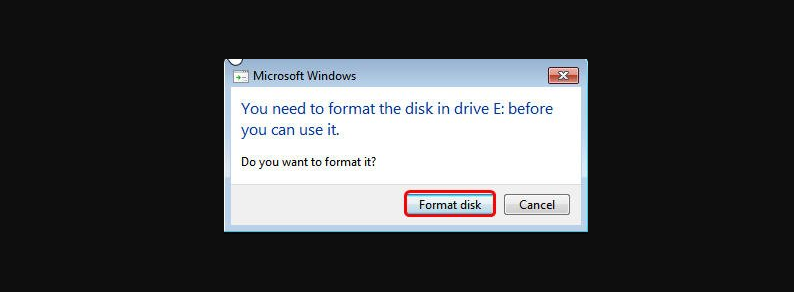
I have 4tb wd external hard disk purchased one month before. I accidentally click on format hard disk become 0 byte. I use some data recovery software but no data show. How to recover data?

This is one email from one single pc user asking for data recovery solutions to recover lost data from above WD 4TB external hard drive.

For this kind of format case, the recovery chance is on the windows os and users can confirm the failure detail by checking the hdd by winhex and find out if all sectors are 0000 or not.

Some format cases cause all 0000 and the data is gone; and some other format cases don’t affect the hex data much and the data is still there.

If the format case doesn’t have other failures, users just need to use data recovery software such as r-studio to scan lost files.

If the format case has bad sectors or firmware corruption, users need to use data recovery hardware tools such as DFL-SRP all-in-one data recovery equipment or DFL PCIE data recovery express to fix firmware issue or image the patient HDD or users need to use DFL-DDP to recover lost data by file types.

Any question is welcome to sales@dolphindatalab.com or add Dolphin Skype ID: dolphin.data.lab
For WD SMR HDDs, they usually have firmware lock and SED V2 lock issue. To unlock the firmware area, users can use firmware unlock PCB. To fix the SED V2 issue, users can use the following methods:

1, Solder wires on original USB PCB;
2, Use
HDD USB-SATA wiring PCB;
3, Use Data Unlock SATA Connectors;

Now we have another method: When the original PCB is physically damaged, users can only transfer the main controller IC to firmware unlock PCB to fix SED v2 issue.

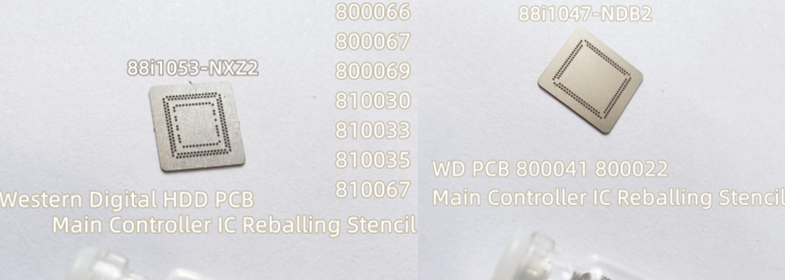
The following two Main Controller IC Reballing Stencils are available now to make the MCU transfer job easier and more successful:

WD 800041 800022 88i1047-NDB2 Main Controller IC Reballing Stencil
WD HDD PCB 88i1053-NXZ2 Main Controller IC Reballing Stencil

WD HDD PCBs with the same 88i1053-NXZ2 Main Controller IC:
800066
800067
800069
810030
810033
810035
810067

Any question is welcome to sales【@】dolphindatalab.com

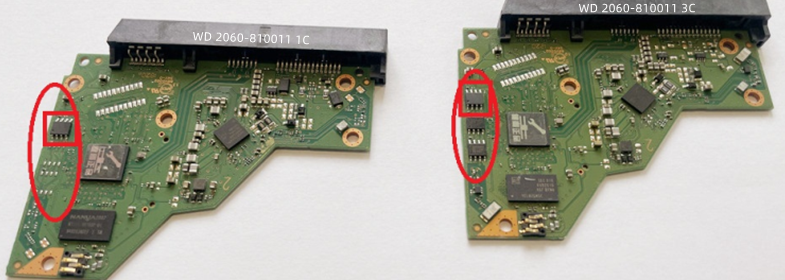
WD 2060-810011 is one very common western digital SMR hard drive PCB number and drives with this number have MCU lock and SED lock.

One thing is important for WD 2060-810011:
This PCB number has two types:

WD 2060-810011 HDD Firmware Unlock PCB-3C Version
WD 2060-810011 HDD Firmware Unlock PCB-1C Version

The 3C version is more common in the market but the 3C and 1C version are not compatible with each other.

Before users buy this WD 2060-810011 unlock PCB, users need to check chip number on the PCB in the picture above.

Any question is welcome to sales【@】dolphindatalab.com

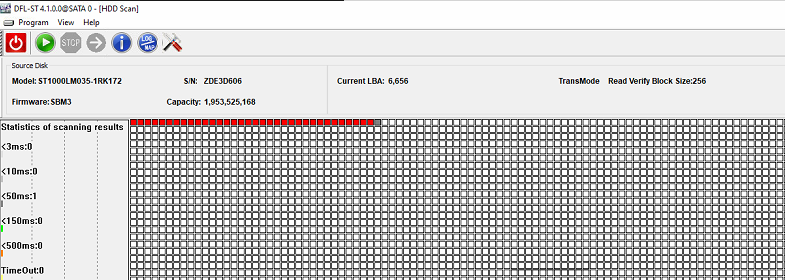
This is one successful data recovery case for Seagate LM Rosewood patient hard drive from one DFL user in India. Happy client again with DFL SRP data recovery hardware tools.

Model : ST1000LM035-1RK172
Serial : ZDE3D606
Firmware : SBM3
Capacity : 1953525168 (931.51GB)
Sector size : 4096
Heads number : 2

FW info : Obtained
FW version : RO08B6.SDM2.CC4676.SBM3
FW package P/N : 100821660
FW ID : 00211320
FW creation date : 2017/06/02
FW creation time : 01:36:16
CFW version : RO08.SDM2.01257352.00211320
SFW1 version : 6B6A

Boot 0x80M
Rst 0x80M

T:0x0012 0x0051BB95
Srv DETCR init 0x0000

FTU

(P) SATA Reset

RAW OFF

PASS
EDAC Value = 00000000FFFFF844

EDAC Value = 00000000FFFFF844

EDAC Value = 00000000FFFFF844

EDAC Value = 00000000FFFFF844

EDAC Value = 00000000FFFFF844

EDAC Value = 00000000FFFFF844

EDAC Value = 00000000FFFFF844

EDAC Value = 00000000FFFFF844

(DOS Table) Worst Count: 00000000 At SU: FFFFFFFF NT: 00000000 OT: 00000000

MCMT table is corrupted

Intel 6G->3G

Send Status: COMRESET seen

CSpd= 3Gbps

DSC

MCMT table is corrupted

Simple steps to fix above case by DFL-Seagate hdd repair tool and DFL-DDP data recovery tool:

1, Unlock Firmware Area;
2, Backup important firmware modules;
3, Media cache fix;
4, Clear G-list and confirm the NG-list entries;
5, Regenerate Translator;
6, Image patient HDD or extract lost data directly by DFL-DDP.

Any question is welcome to sales@dolphindatalab.com or add Dolphin Skype ID: dolphin.data.lab