Posts

F3 T>^l
RECOV Servo Op=0095 Resp=0005

SIM FileFD=FC37D103 ErrorCode=43160080 DiscLBA=0000000000009D9C Duration=000006C3 ms
RECOV Servo Op=0195 Resp=0005
RECOV Servo Op=0095 Resp=0005

SIM FileFD=FC37E104 ErrorCode=43160080 DiscLBA=0000000000009DCC Duration=000005FF ms
RECOV Servo Op=0195 Resp=0005
RECOV Servo Op=0095 Resp=0005

SIM FileFD=FC37B101 ErrorCode=43160080 DiscLBA=0000000000009D3A Duration=000007C8 ms
RECOV Servo Op=0195 Resp=0005
M11 CheopsLiteA SATA 2.0 RAP30.8.2 SMR 2MB Flash 150 zn zoneds
Product FamilyId: 72, MemberId: 01
HDA SN: WCK0MT1K, RPM: 5527, Wedges: 178, Heads: 8, OrigHeads: A, ActiveHdMap: 00FF, Lbas: 00003ADABD42, PreampType: 84 30
Bits/Symbol: C, Symbols/UserSector: CB6, Symbols/SystemSector: CB5
PCBA SN: 0000E735FUZK, Controller: CHEOPSLITE_1_0_SATA(1410), Channel: Unknown, PowerAsic: Unknown Rev 00, BufferBytes: 8000000
SF ID: EF 60, SF Part Size: 800, Flash Used: 800
Package Version: M1A1804D6.SDMA.MD0004., Package P/N: ———, Package Global ID: 00480560,
Package Build Date: 12/27/2016, Package Build Time: 23:14:40, Package CFW Version: M1A1804D6.SDMA.MD0004.01174104.00480560.,
Package SFW1 Version: D604, Package SFW2 Version: —-, Package SFW3 Version: —-, Package SFW4 Version: —-
Controller FW Rev: 12272314, CustomerRel: 0001, Changelist: 01174104, ProdType: M1A1804.SDMAQC, Date: 12/27/2016, Time: 231440, UserId: 00480560
Servo FW Rev: D604
TCG IV Version: 30.05
Package BPN: 8
RAP FW Implementation Key: 1E, Format Rev: 0206, Contents Rev: 2B 03 13 00
Active BFW Container: 1
4K Sys Area: 1
Features:
– IOEDC enabled
– IOECC enabled
– DERP enabled v. 6.0.00.0000000000000001
– LTTC-UDR2 disabled
– SuperParity 4.1 enabled
– Humidity Sensor disabled
– Media Cache Partition enabled
– Media Cache enabled
– Low Current Spin Up Normal
– Ready Sequence Optimization disabled
– Torn Write Protection enabled
– Zone Remap disabled
– AGB enabled
– SubRelease:0
– Critical Event Log v. 1
– FAFH 40.11 disabled
– EWP:0
– DRAM Mirror:0^z
ASCII Diag mode

F3 T>i4,1,22

RECOV Servo Op=01A5 Resp=0005
F3 T>^z
ASCII Diag mode

F3 T>V4
Reassigned Sectors List Enabled
Entries: 0000, Alts: 0000, Removed: 0000,
Pending: 0000, Host Pending: 0000, Max RSL Size: 00008400 Idx LBA PBA LLLCHS of LBA Wdg PLPCHS of PBA SFI Hours Msecs Status BBM Mask

F3 T>m0,6,3,,,,,22

RECOV Servo Op=0095 Resp=0005

SIM FileFD=FC375035 ErrorCode=43160080 DiscLBA=000000000000B511 Duration=00000693 ms
RECOV Servo Op=0195 Resp=0005

SIM FileFD=FC375035 ErrorCode=43160080 DiscLBA=0000000000022A3C Duration=00000953 ms
RECOV Servo Op=0095 Resp=0005

SIM FileFD=FC36D01D ErrorCode=43160080 DiscLBA=000000000000A424 Duration=000006E4 ms
RECOV Servo Op=0195 Resp=0005

SIM FileFD=FC36D01D ErrorCode=43160080 DiscLBA=000000000002194F Duration=00000964 ms
DiagError 0000500EProcess Defect List Error
R/W Sense 00000002, R/W Error 041C0087, List Offset 00000000, List Index FFFFFFE8, File Error 00000000

F3 T>^a
Prod Desc: M11 CheopsLiteA SATA 2.0 RAP30.8.2 SMR 2MB Flash 150 zn zonedservo 5400RPM
Package Version: M1A1804D6.SDMA.MD0004.
Serial #: WCK0MT1K
Changelist: 01174104
Model #: ST4000LM024-2AN17V
ID: 101
Servo FW Rev: D604
Heads: 8
PCBA SN: 0000E735FUZK
Default factory config: SD&D
Active config: SD&D

TotalHostWrites 00000000

NumberOfSegWrites 0000

TotalHPCBROs 00000000

TotalBWOs 00000000

MCMTWrites 00000000

Idle1Count 0000

MCSegmentUsed 0000

For above patient ST4000LM024 HDD data recovery, users need to open the patient HDD in clean room, find donor heads and swap the heads with proper hdd head replacement tools to continue.

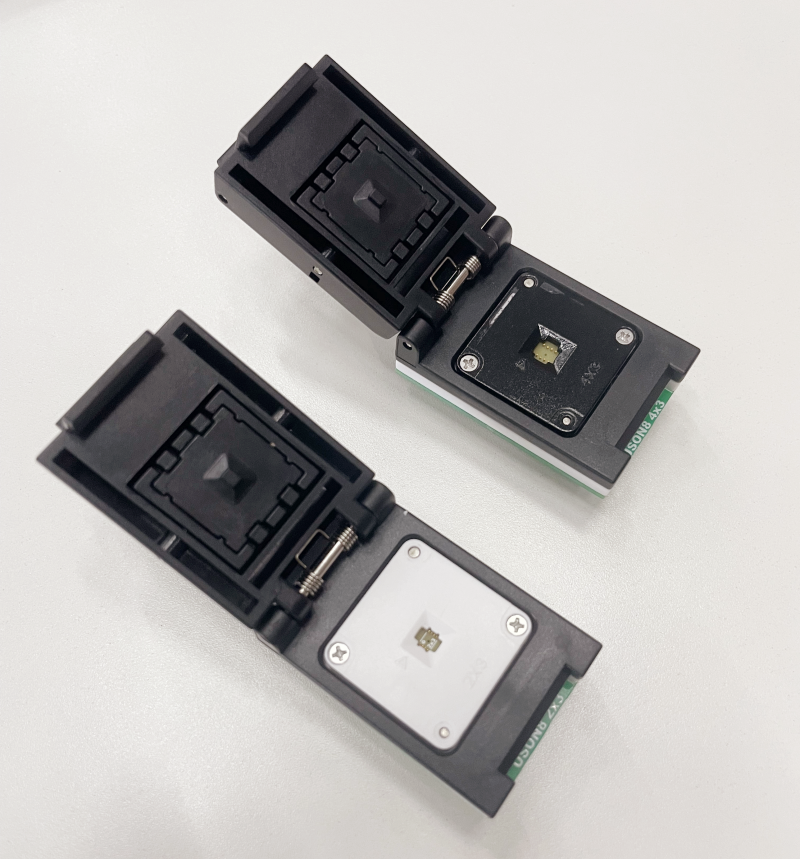
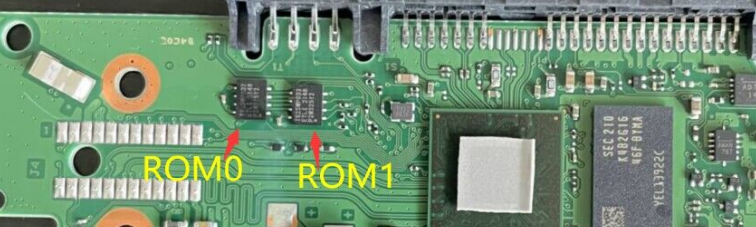
There are many new hard drives using new mini bios chips on the PCB containing the rom modules and hex data. Some PCBs have one mini bios chip and some PCBs have two mini bios chips: rom chip 0 and rom chip 1.

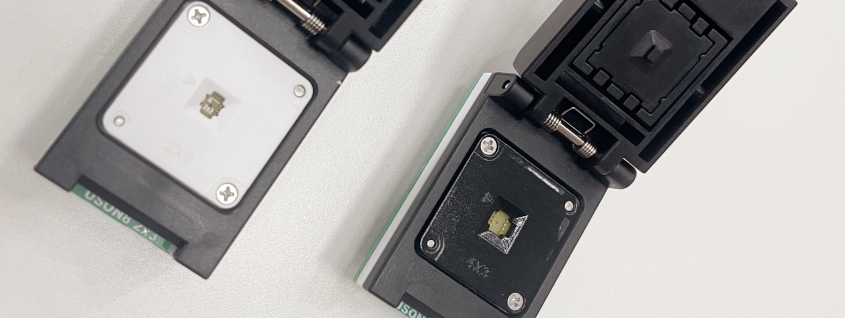
Mini rom chip size: 4mm x 3mm and 3mm x 2mm
HDD Mini ROM Chip Reader Pro. 4-3
HDD Mini ROM Chip Reader Pro. 3-2

If the pcbs have two mini bios chips, users need to read the rom one by one and name them as rom 0.bin and rom 1.bin and when users are going to write rom, users need to write rom0.bin to rom 0 chip and write rom 1.bin to rom chip 1.

These new drives are mainly Seagate new drives, Seagate helium drives, WD hitachi helium drives and also some other new drives too.

To read and write the rom contents, users need to use the latest Mini ROM Chip Reader here.

Any question is welcome to sales@dolphindatalab.com or add Dolphin Skype ID: dolphin.data.lab

Example models of WD PCB 810082 SMR HDDs:

WD20JDRW-11C7VS0, 810082-000
WD20JDRW-11C7VS1, 810082-000

HDD Family: FBLite2

Please note WD PCB 810082 HDDs are SMR drives with module 190 and users can select the following tools which are helpful for firmware repair and data recovery.

WD PCB 810082 HDD Firmware Repair Tool: DFL WD HDD Firmware Repair Tool
Users can repair WD HDD firmware module damage, reset smart, remove password, edit HDD ID, etc.

WD PCB 810082 HDD Data Recovery Tool: DFL DDP Data Recovery Equipment
Users can repair module 190, auto load T2data, image WD HDDs with weak heads, bad sectors, common firmware failures, can extract lost partitions, folders, files, etc;

WD PCB 810082 SMR HDD Head Replacement Tool

WD 810082 USB-SATA Adapter Smart

G3 WD SMR HDD 810082 USB-SATA Data Recovery Adapter Pro.


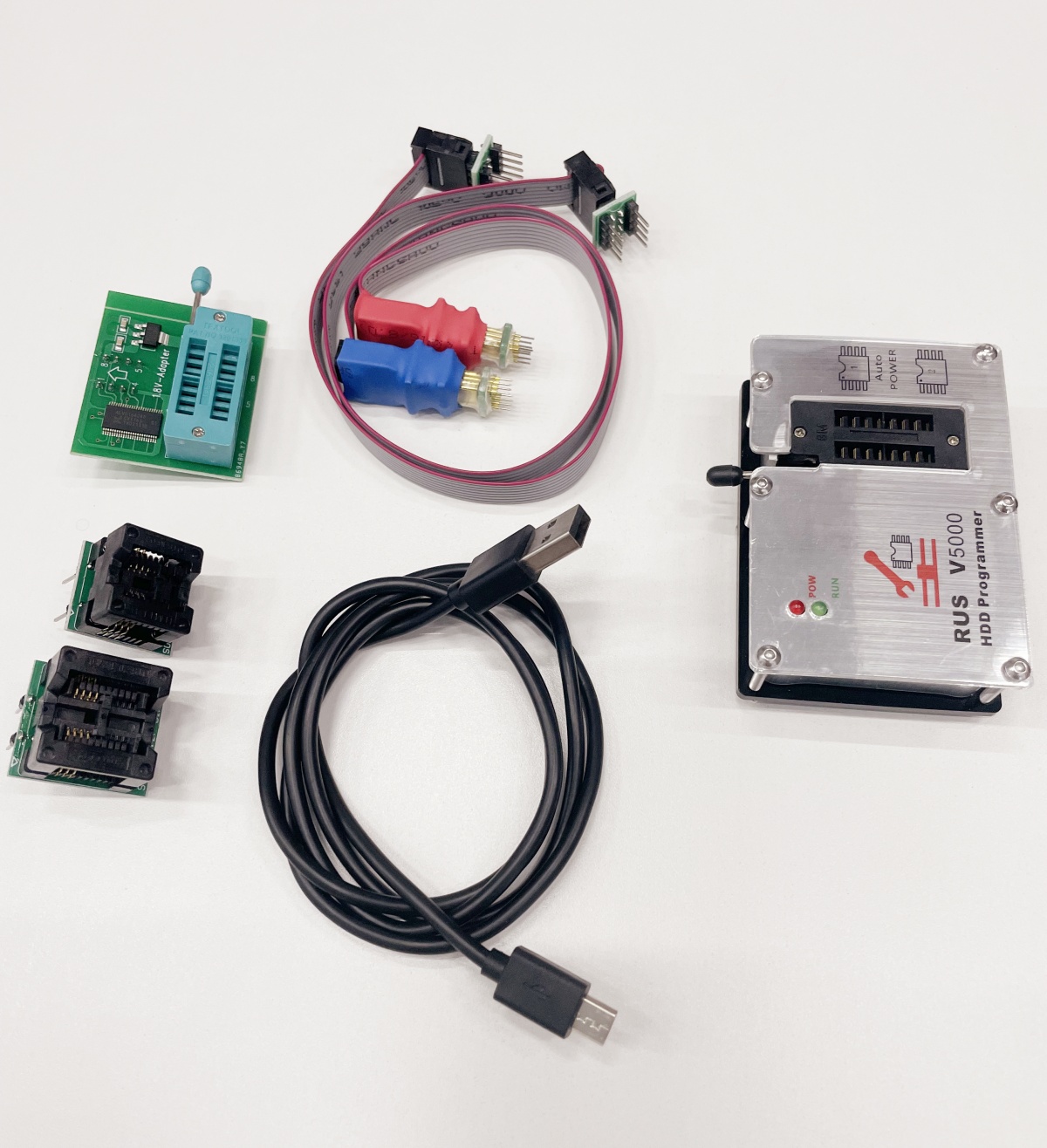
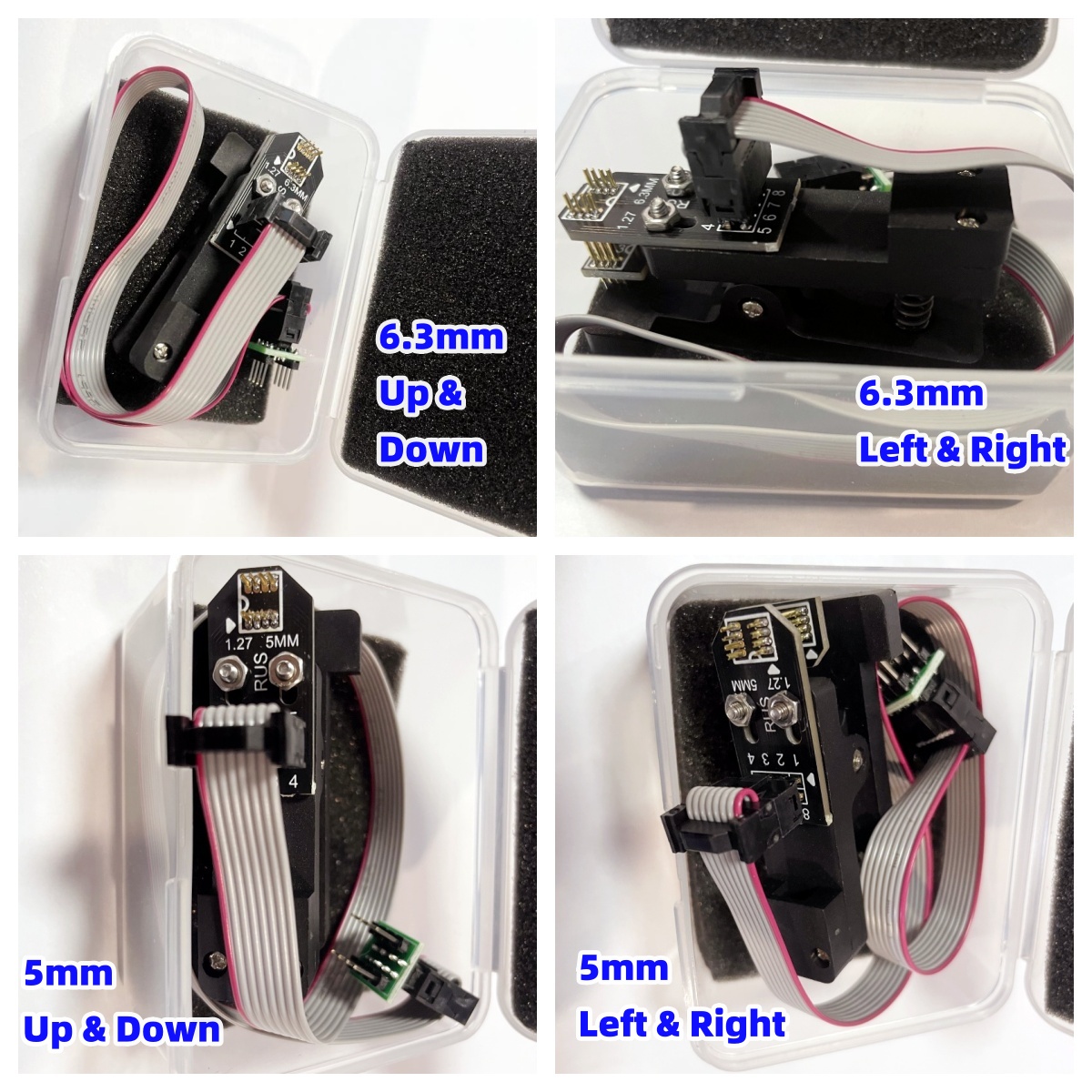
Chip-on HDD Flash Programmer Smart/HDD ROM Chip Pin Reader
Users don’t need to solder ROM chips off and read rom chip directly, super easy for WD SMR HDD ROM read and write

Example models of WD PCB 810030 810033 810035 810067 SMR HDDs:

WD50NPZZ-00A9JT0, 810030-001
WD50NDZM-11BCXS1, 810033-001
WD40NDZM-11BCXS1, 810033-001
WD40NDZM-59A8KS1, 810033-001
WD40NMZM-59A8XS1, 810033-001
WD50NMZM-59A8XS1, 810033-001

WD50NDZW-11A8JS1, 810035-000
WD50NMZW-59BCBS0, 810035-000
WD40NMZW-59BCBS0, 810035-000
WD40NDZW-11BCVS0, 810035-000
WD40NDZW-11BCVS1, 810035-000
WD50NDZW-11BCSS0, 810035-000
WD40NDZW-11BCSS0, 810035-000
WD40NDZW-11BCSS1, 810035-000
WD50NDZW-11BCSS1, 810035-000

WD40NMZW-11BGRS1, 810067-000
WD50NDZW-11BHVS1, 810067-000
WD50NDZW-11BGSS1, 810067-000
WD50NMZW-11BGRS1, 810067-000
WD40NDZW-11BHVS1, 810067-000

HDD Family: Spyglass III

Please note WD PCB 810030 810033 810035 810067 HDDs are SMR drives with module 190 and users can select the following tools which are helpful for firmware repair and data recovery.

WD HDD Firmware Unlock SATA PCB for PCB 810030 810033 810035 810067 

WD PCB 810030 810033 810035 810067 HDD Firmware Repair Tool: DFL WD HDD Firmware Repair Tool
Users can repair WD HDD firmware module damage, reset smart, remove password, edit HDD ID, etc.

WD PCB 810030 810033 810035 810067 HDD Data Recovery Tool: DFL DDP Data Recovery Equipment
Users can repair module 190, auto load T2data, image WD HDDs with weak heads, bad sectors, common firmware failures, can extract lost partitions, folders, files, etc;

WD PCB 810030 810033 810035 810067 SMR HDD Head Replacement Tool

WD 810033 USB-SATA Adapter Smart

WD 810035 USB-SATA Adapter Smart

WD 810067 USB-SATA Adapter Smart

G3 WD SMR HDD 810033 USB-SATA Data Recovery Adapter Pro.

G3 WD SMR HDD 810035 USB-SATA Data Recovery Adapter Pro.

G3 WD SMR HDD 810067 USB-SATA Data Recovery Adapter Pro.


Chip-on HDD Flash Programmer Smart/HDD ROM Chip Pin Reader
Users don’t need to solder ROM chips off and read rom chip directly, super easy for WD SMR HDD ROM read and write

Example models of WD PCB 800077 SMR HDDs:

WD20EFAX-68FB5N0 2060-800077-003 REV P1
WD20EZAZ-00GGJB0 2060-800077-003 REV P1
WD60EDAZ-11BMZB0 2060-800077-003 REV P1
WD60EMAZ-51TKPB0 2060-800077-003 REV P1
WD60EZAZ-00ZGHB0 2060-800077-003 REV P2
WD60EFAX-68SHWN0 2060-800077-003 REV P1

HDD Family: CARMEL

Please note WD PCB 800077 HDDs are SMR drives with module 190 and users can select the following tools which are helpful for firmware repair and data recovery.

WD HDD Compatible Firmware Unlock SATA PCB: 800077
WD 2060-800077 HDD Firmware Unlock PCB

WD PCB 800077 HDD Firmware Repair Tool: DFL WD HDD Firmware Repair Tool
Users can repair WD HDD firmware module damage, reset smart, remove password, edit HDD ID, etc.

WD PCB 800077 HDD Data Recovery Tool: DFL DDP Data Recovery Equipment
Users can repair module 190, auto load T2data, image WD HDDs with weak heads, bad sectors, common firmware failures, can extract lost partitions, folders, files, etc;

WD PCB 800077 SMR HDD Head Replacement Tool

Chip-on HDD Flash Programmer Smart/HDD ROM Chip Pin Reader
Users don’t need to solder ROM chips off and read rom chip directly, super easy for WD SMR HDD ROM read and write

Example models of WD PCB 800065 800067 810003 SMR HDDs:

2060-800067-001:

WD20SMZW-11JW8S0
WD20SMZW-11JW8S1
WD20SMZW-11YFCS0
WD20SMZW-34JW8S0
WD20SMZW-34JW8S1
WD20SMZW-59JW8S1
WD20SMZW-59YFCS0
WD20SMZW-59YFCS1
WD20SMRW-59YNDS0
WD20SDZW-11Z3CS0
WD20SDRW-11VUUS0
WD20SDRW-34VUUS0
WD15SMZW-11YFCS0
WD15SMRW-11YNDS0

2060-800065-002:

WD20SPZX-08UA7T0
WD20SPZX-11CRAT0
WD20SPZX-22CRAT0
WD20SPZX-21UA7T0
WD20SPZX-75UA7T1

2060-810003-001:

WD20SDZM-59TM5S1
WD20SMZM-59H3FS1

HDD Family: Charger

Please note WD PCB 800065 800067 810003 HDDs are SMR drives with module 190 and users can select the following tools which are helpful for firmware repair and data recovery.

WD HDD Compatible SATA PCB for USB PCB 800067 and 810003: 800065
Find the Compatible Unlock SATA PCB 800065 here

WD PCB 800065 800067 810003 HDD Firmware Repair Tool: DFL WD HDD Firmware Repair Tool
Users can repair WD HDD firmware module damage, reset smart, remove password, edit HDD ID, etc.

WD PCB 800065 800067 810003 HDD Data Recovery Tool: DFL DDP Data Recovery Equipment
Users can repair module 190, auto load T2data, image WD HDDs with weak heads, bad sectors, common firmware failures, can extract lost partitions, folders, files, etc;

WD PCB 800065 800067 810003 SMR HDD Head Replacement Tool

WD 800067 USB-SATA Adapter Smart

WD 810003 USB-SATA Adapter Smart

G3 WD SMR HDD 800067 USB-SATA Data Recovery Adapter Pro.

G3 WD SMR HDD 810003 USB-SATA Data Recovery Adapter Pro.

Chip-on HDD Flash Programmer Smart/HDD ROM Chip Pin Reader
Users don’t need to solder ROM chips off and read rom chip directly, super easy for WD SMR HDD ROM read and write

Example models of WD PCB 800066 800069 800086 SMR HDDs:

WD10SPZX-24Z10T1 2060-800066-006 P1
WD10SPZX-22Z10T0 2060-800066-004
WD10SPZX-24Z10T0 2060-800066-004
WD10SPZX-60Z10T0 2060-800066-006
WD10SMZW-11Y0TS0 2060-800069-001
WD10SMZW-59Y0TS0 2060-800069-001 REV P1

HTS541010BE610 2060-800066-004 Rev P1
WD5000LMZW-11Y0TS0 2060-800069-001

WD10SMZW-34Y0TS0 800069-001
WD10SDZW-11UMGS0 2060-800069-001
WD10SDZW-59UMGS0 2060-800069-001
WD10SDRW-11A0XS0 2060-800069-001
WD10SDRW-11A0XS1 2060-800069-003
WD10SDRW-34A0XS0 2060-800069-003 REV P1

WD10SMZM-59WKCS0 2060-800086-000 Type C

HDD Family: Palmer

Please note WD PCB 800066 800069 800086 HDDs are SMR drives with module 190 and users can select the following tools which are helpful for firmware repair and data recovery.

WD HDD Compatible SATA PCB for USB PCB 800069 and 800086: 800066
Find the Compatible Unlock SATA PCB 800066 here

WD PCB 800066 800069 800086 HDD Firmware Repair Tool: DFL WD HDD Firmware Repair Tool
Users can repair WD HDD firmware module damage, reset smart, remove password, edit HDD ID, etc.

WD PCB 800066 800069 800086 HDD Data Recovery Tool: DFL DDP Data Recovery Equipment
Users can repair module 190, auto load T2data, image WD HDDs with weak heads, bad sectors, common firmware failures, can extract lost partitions, folders, files, etc;

WD PCB 800066 800069 800086 SMR HDD Head Replacement Tool

WD 800069 USB-SATA Adapter Smart

G3 WD SMR HDD 800086 USB-SATA Data Recovery Adapter Pro.

Chip-on HDD Flash Programmer Smart/HDD ROM Chip Pin Reader
Users don’t need to solder ROM chips off and read rom chip directly, super easy for WD SMR HDD ROM read and write

Example models of WD PCB 800041 810012 800022 HDDs:

2060-800041-003
WD50NDZW-11MR8S1
WD40NMZW-59GX6S1
WD40NMZW-11GX6S1
WD40NDZW-11MR8S1
WD40NDZW-11MR8S0
WD40NMZW-34GX6S1
WD30NDZW-11MR8S1
WD30NMZW-11GX6S1
WD30NMZW-59GX6S1
WD30NMZW-11A8NS1
WD30NMZW-11LG6S1
WD30NMZW-11LG6S0

2060-810012-000
WD40NDZM-59PW8S1
WD40NMZM-59Y94S1

2060-800022-000
WD30NPRZ-00YRMT0
WD30NPRZ-11YRMT0

2060-800022-002
WD40NPZZ-00PDPT0
WD30NPZZ-00PDPT0

HDD Family: Spyglass/Spyglass 2

Please note the old WD PCB 800041 800022 Spyglass HDDs don’t have module 190 and they are not SMR drive, users can try to short connect TV9 and TV10 to access the firmware area if the patient drives are undetected or busy; For Spyglass 2 drives, they are SMR drives with module 190 and users can select the following tools which are helpful for firmware repair and data recovery.

Compatible SATA PCB for USB PCB 800041 and 810012: 800022
Find the compatible SATA PCB 800022 here

WD PCB 800041 810012 800022 HDD Firmware Repair Tool: DFL WD HDD Firmware Repair Tool
Users can repair WD HDD firmware module damage, reset smart, remove password, edit HDD ID, etc.

WD PCB 800041 810012 800022 HDD Data Recovery Tool: DFL DDP Data Recovery Equipment
Users can repair module 190, auto load T2data, image WD HDDs with weak heads, bad sectors, common firmware failures, can extract lost partitions, folders, files, etc;

WD PCB 800041 810012 800022 HDD Head Replacement Tool

WD 800041 USB-SATA Adapter Smart

G3 WD SMR HDD 800041 USB-SATA Data Recovery Adapter Pro.

WD 810012 USB-SATA Adapter Smart

G3 WD SMR HDD 810012 USB-SATA Data Recovery Adapter Pro.

Chip-on HDD Flash Programmer Smart/HDD ROM Chip Pin Reader
Users don’t need to solder ROM chips off and read rom chip directly, super easy for WD SMR HDD ROM read and write

WD HDD Compatible SATA PCB for USB PCB 800038: 800025
Find the compatible SATA PCB 800025 here

WD PCB 800038 800025 HDD Firmware Repair Tool: DFL WD HDD Firmware Repair Tool
Users can repair WD HDD firmware module damage, reset smart, remove password, edit HDD ID, etc.

WD PCB 800038 800025 HDD Data Recovery Tool: DFL DDP Data Recovery Equipment
Users can image WD HDDs with weak heads, bad sectors, common firmware failures, can extract lost partitions, folders, files, etc;

WD PCB 800038 800025 HDD Head Replacement Tool

Example models of WD PCB 800038 800025 HDDs:

WD2500LMCW-11D9GS3 800038
WD5000LMCW-11T31S1 800038
WD5000LPCX-22VHAT0 800025
WD5000LUCX-28LYRY0 800025

HDD Family: Hubble LT /  HubLT2

Please note: WD PCB 800038 800025 HDDs don’t have module 190 and it is not SMR drive, users can try to short connect TV9 and TV10 to access the firmware area.

Chip-on HDD Flash Programmer Smart/HDD ROM Chip Pin Reader
Users don’t need to solder ROM chips off and read rom chip directly, super easy for WD SMR HDD ROM read and write

DFL Seagate HDD Firmware Repair User Manual 2024 is available to Dolphin Seagate users worldwide.

Seagate Firmware Repair Manual Index

01: DFL Seagate Hardware & Software P1-2
02: Seagate HDD Types and Working Modes P5-6

03: Look Into Seagate T> Drives(Old Drives) P6-24

3.0 Seagate T>Drive Families P6-7
3.1 Firmware Modules of Seagate T> Drives P7-8
3.2 Identify Corrupted Module P8-10
3.3 How to Fix Corrupted Modules of T> Drives P10
3.4 SMART and G-list P11
3.5 T drives Common Commands and Tips P11-18
3.6 Common Failures and Solutions for T> Drives P18-22
3.7 How to judge if it’s head damage P22-24

04: Look Into Seagate F3 T> Drives (New Drives) P24-64

4.1 F3 Families P24
4.2 How to Identify F3 drives P24-25
4.3 Important Firmware Modules of F3 T> Drives P25
4.4 Important SYS files of F3 T>Drives P25
4.5 General Steps to use DFL Seagate hdd firmware repair software P25-26

4.6 Power on Patient HDD, hdd is not spinning, what to do? P26-27
4.7 How to Repair Weak-Head HDDs by adjusting adaptive temperature P27-28
4.8 How to Edit Head Map in ROM P28-30
4.9 How to Obtain Preamp Type; P30-31
4.10 How to Edit Head Map in RAM P31-32
4.11 Swap Heads Directly if FAIL Servo Op=0100 Resp=0003 Keeps Coming P32

4.12 How to Fix ‘SimError-remaining in BootFW’, ‘Perform a double download without a power cycle’ P32-33

4.13 Patient Drive is Busy or LED and Cannot Enter F3 T>, What to Do? P33-42
>Short connect PCB to enter F3 T> for old F3 drives; P33-34
>Virtual boot by writing adaptive rom and load SYS20D to enter F3 T>; P34-35
>Generate and write adaptive CC49 ROM for 7200.12 3F family and load CC49 loader with the same head number; P35-36
>Load Backup and Write; P36-39
>Disable Subsystem; P39-41
>Grasp the best time to enter F3 T> before the HDD enters LED status; P41
>How swap to access F3 T>; P41-42

4.14 ROM Backup and Write; P42-47
4.15 How to unlock firmware area if locked; P44-47
4.16 Seagate Lombard(70) and Megalodon(63) Firmware Unlock; P47-48
4.17 How to backup SYS files/firmware modules? P48-53
>The sys file table is empty and the sys files aren’t listed, how to backup sys files? P51
>How to Read SYS by Menu-Edit SYS Files P51-53
4.18 How to write SYS file(SYS 35-NGlist) P53-54
4.19 How to fix the partial sector access firmware failure without SYS35 backup(partial sector access auto repair) P54-55
4.20 How to Edit HDD ID; P55-56

4.21 How to fix the data ‘encryption’ issue of Seagate F3 HDD? P56-59
>01: Remove Password or Remove Password 2; P56
>02: Seagate SMR Format Recovery; P56-57
>03: B2 Data Offset Fix; P57-58
>04: Unlock the firmware area permanently; P58-59

4.22 How to Test SYS Files; P59-61
4.23 How to Fix Seagate Slow Issue and Lots of Starting LBA of RW Request Errors P61-62
4.24 Common Seagate HDD Firmware Failure Fix-Quick Firmware Repair Solutions P62-63
4.25 Seagate SSHD(Kahuna_5400) Doesn’t Spin Up, How to Fix? P63
4.26 Functions or Operations Which Can Destroy Data P63-64

Users can get this latest user manual from Dolphin support engineer or your sales representative.
Any question is welcome to sales@dolphindatalab.com or add Dolphin Skype ID: dolphin.data.lab