
Rebranded SM2259XT SSD Controllers:
Kingston CS5341AA
SM59XT2A
ADATA Internal Codes
Common Known SSDs Using SM2259XT Controllers:
Crucial BX500 SSD
Kingston A400 SSD
Silicon Power Slim S55 SSD
KingSpec P3 SSD
Dahua DSS SSD

Rebranded SM2259XT SSD Controllers:
Kingston CS5341AA
SM59XT2A
ADATA Internal Codes
Common Known SSDs Using SM2259XT Controllers:
Crucial BX500 SSD
Kingston A400 SSD
Silicon Power Slim S55 SSD
KingSpec P3 SSD
Dahua DSS SSD
Rebranded SSD Controllers:
ASolid AS2258
ADATA Internal Codes N05K93
H6578
Common Known SSDs Using SM2258XT Controllers:
Crucial BX500
WD Green (SATA)
Patriot P200
Silicon Power Slim S55
HP S700
Kimtigo s300
Transcend 820
Colorful SL500(480GB)
360 Security Guard SSD
Common Known SSDs Using SM2256K Controllers:
ADATA Premier SP550
AMD Radeon R3 Series
Asgard M.2 240GB SSD
Colorful SL300 120GB/240GB
Kimtigo M.2 SATA SSD
SanDisk SSD Plus (SM2256S variant)
Ramsta S600
Tigo SSDs
Vastking V900 M.2 2242(128GB)
Common known SSDs Using SM2246XT Controllers:
Agrade ST40 SSD
Netac N5S 60GB SSD
Lexar Professional 3400x
SanDisk SSD Plus
SanDisk SSD Z400s
Silicon Power Slim SSD S55
Silicon Power Slim S60
Teclast S500 SSD
Viking Technology M.2 SATA SSD
Transcend P3XV60: Specific internal identifier for its drives that utilize the SM2246XT controller;
ADATA ISC3E: internal name used by ADATA for the SM2246XT controller.
PS3109 failed SSD: detected as Phison SSD, capacity detected in safe mode as 2mb or 20mb.
Most SSDs are using PS3109 controller under its standard Phison marking.
Common known SSDs Using PS3109 Controllers:
Kingston SSDNow V310
PNY Prevail / XLR8 (Early variants)
Patriot Blaze
Silicon Power Slim S55
Mushkin Atlas Vital
Zotac T500 / T120
The list below is a collection of the PS3110 rebranded or OEM SSD controllers and in safe mode these SSD drives will be detected as ‘SATAFIRM S10′.
Kingston CP33238B-PS3110
Phison S10DC-PS3110
Toshiba TC58NC1000GSB-PS3110
Common known SSDs Using PS3110 Controllers:
Kingston HyperX Savage
Kingston KC310
Corsair Neutron XT
OCZ Trion 100
Sony SLW-M Series
Patriot Ignite
The list below is a collection of the PS3111 rebranded or OEM SSD controllers and in safe mode these SSD drives will be detected as ‘SATAFIRM S11′.
Asolid-AS2258
Hosin Global-HG2258
Initio INIC-6081
Kingston CP33238B-PS3111
Transcend 02-3010
Toshiba TC58NC1010
Common known SSDs Using PS3111 Controllers:
Corsair Force LE200
Gigabyte SSD
Inland Professional SATA III
Kingston A400
PNY CS900
Patriot Burst / Patriot Spark
Silicon Power Slim S55: Certain versions of this drive
Toshiba OCZ TR200
Data Recovery Tools Used:
–DFL-DDP data recovery software
-DFL-SSD firmware repair software
SSD Data Recovery Steps 2026:
01: Open DFL-SSD firmware repair software, power on patient ssd, wait until ready(short to get ready when necessary);
02: Enter DFL-SSD firmware repair software, click LOD icon;
03: Switch to safe mode;
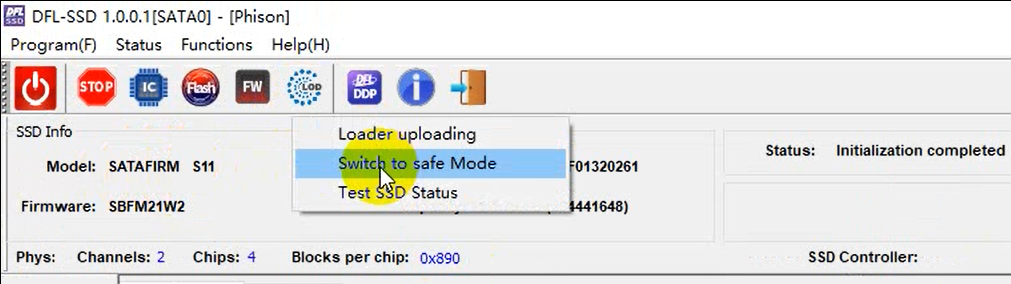
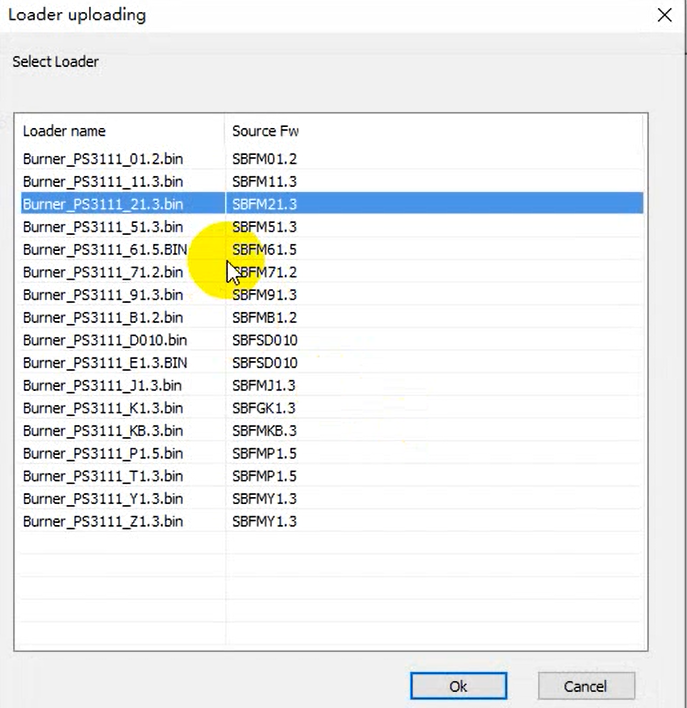
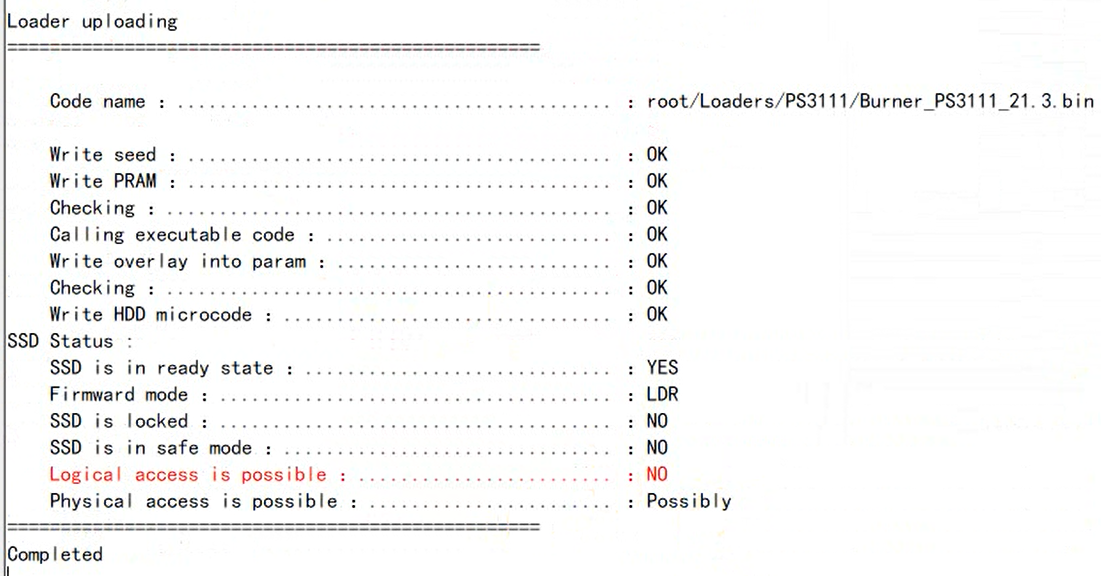
04: LOD>Loader Uploading(loaders are available within the software), the loader will be automatically selected;
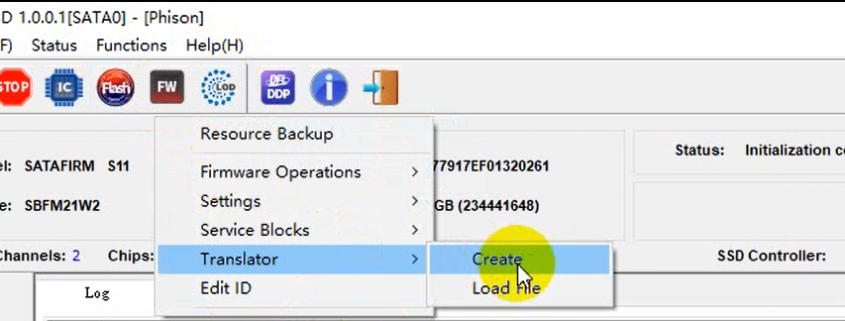
05: Click FW icon, FW>Translator>Create
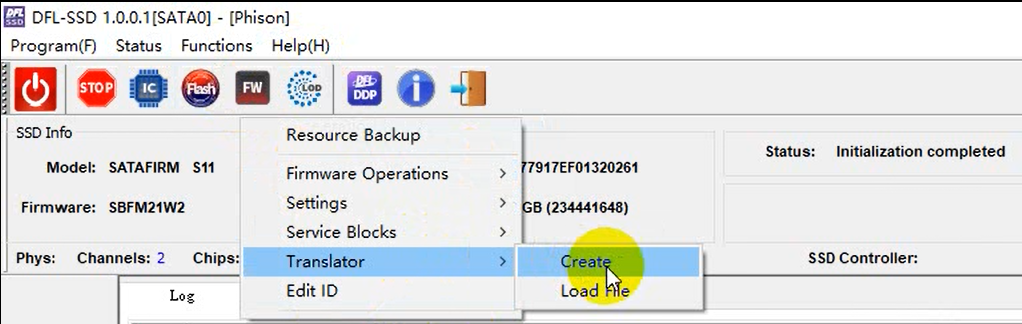
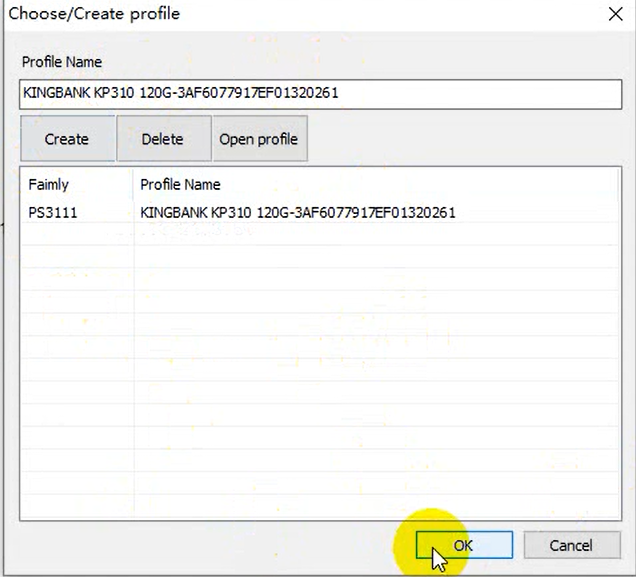
Create/select working directory
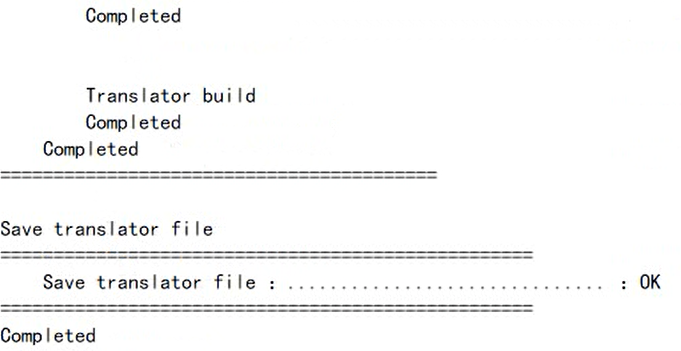
After the translator is created and the translator file is saved successfully, users can see the following messages in the log window:
06: Click DFLDDP icon within the SSD software
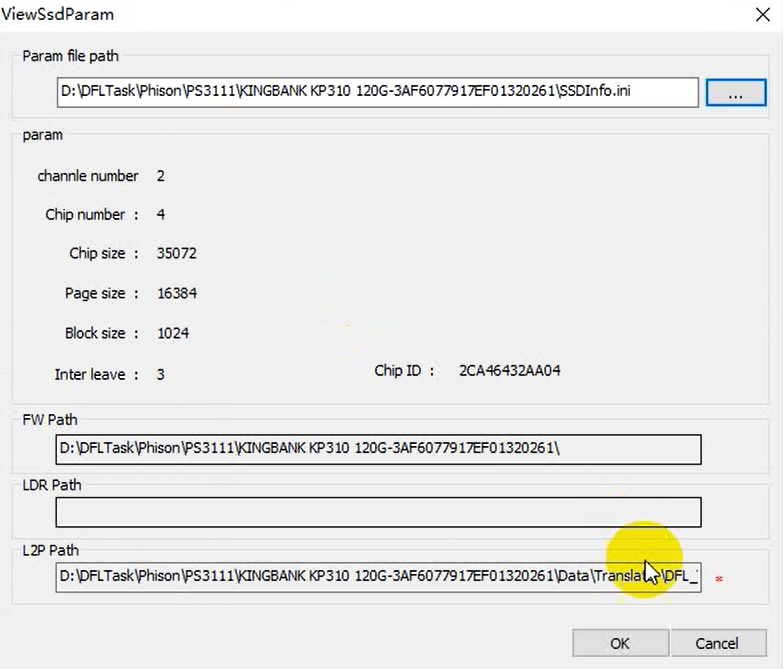
After above setting, users can click ‘ok’ and the software will switch to DFL-DDP data recovery software-file extraction interface. Users can start to extract the lost files directly or run disk image.
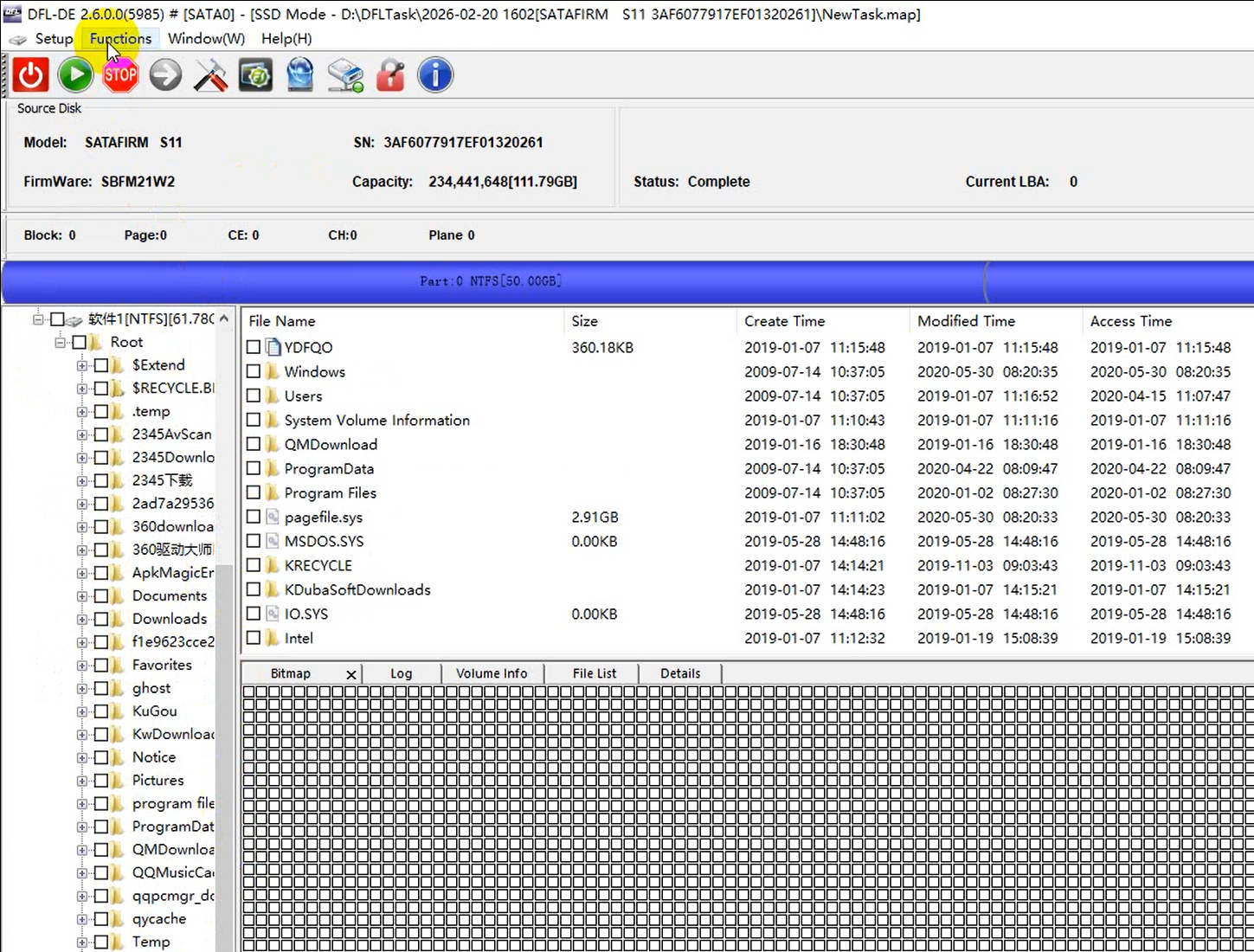
Firmware issue is one common failure for different SSDs, to fix the firmware issue in SSD is mainly to fix the translator.
The following are the general SSD firmware repair and data recovery steps:
01: SSD short connection if necessary(undetected/busy)
02: Select the SSD controller manufacturer, controller ID and SSD family;
03: Load loader
04: Regenerate translator
05: Set patient HDD info to enter DFL-DDP for file extraction.
Dolphin All-in-one Data Recovery Adapter USB3.0 Version
Apple SSD Data Recovery Adapter Pro.
For a Better SSD Data Recovery Success Rate
SSD Data Recovery Tools & Adapters
SSD common failures and data recovery cases:
01: SSD bad sector data recovery-After a long-term use and repeated data read and write, the SSD can suffer bad sectors and become very slow or gets stuck;
02: Physical connector failure;
03: System file/file system corruption;
04: Motherboard compatibility issue;
05: Firmware corruption/translator issue;
06: Controller corruption/SSD physical failures.
Related SSD Data Recovery Tools:
Dolphin All-in-one Data Recovery Adapter USB3.0 Version
Apple SSD Data Recovery Adapter Pro.
For a Better SSD Data Recovery Success Rate
SSD Data Recovery Tools & Adapters

One-stop data recovery tools and advanced data recovery training courses.

 Digital Multimeter Pro.
Original price was: $103.00.$89.00Current price is: $89.00.
Digital Multimeter Pro.
Original price was: $103.00.$89.00Current price is: $89.00.
 Head and Platter Swap Pro. Advanced
Original price was: $680.00.$550.00Current price is: $550.00.
Head and Platter Swap Pro. Advanced
Original price was: $680.00.$550.00Current price is: $550.00.
 Western Digital Hard Drive Firmware Repair Package
$920.00
Western Digital Hard Drive Firmware Repair Package
$920.00