
SM2258XT SSD Firmware Repair and Data Recovery Steps
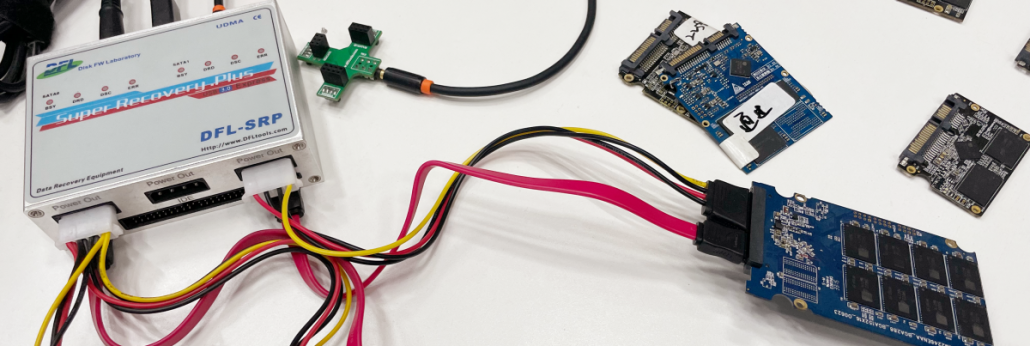
My SM2258XT SSD was not detected any more and I lost all the valuable data, how to recover them?
My SM2258XT SSD was running very slowly and sometimes enters bluescreen and get stuck, how to get the lost data back?
Please note: to recover deleted data or formatted data from SSD is usually not possible due to the SSD trim command design, all the data becomes 0000 after the trim command is executed. Users can select to turn it off before using the SSD and then it is possible to recover the deleted/formatted data.
SM2258XT SSD Firmware Repair and Data Recovery Tools:
DFL-SSD Firmware Repair Software
DFL-DDP Data Recovery Tool
SM2258XT SSD Firmware Repair and Data Recovery Steps:
If the patient SSD is detected properly, just has some bad sectors, users can connect the SSD to DFL-SRP data recovery hardware to image or extract the lost data directly. If not detected or not ready, users need to follow the steps below:
01: Open DFL-SSD firmware repair software, select the SSD manufacturer-Silicon Motion and controller brand-SM2258XT;
02: Short connect the SSD PCB and power on and wait until the hdd gets ready;
03: enter software and load loader for the first time, select any loader to load to get the ISP version(loader version of the patient SSD);
04: Power off and on and re-enter the software and load the correct loader for the second time;
05: Create translator;
06: Click DFLDDP to enter data recovery software for file extraction or disk image.
Video Demo of SM2258XT SSD Firmware Repair and Data Recovery Steps







Leave a Reply
Want to join the discussion?Feel free to contribute!