Posts

With DFL Seagate HDD firmware repair tool, users can easily fix the Seagate firmware corruption and get lost data from Seagate undetected or wrongly detected hard drives. The following is one successful data recovery case study from one DFL user in Indonesia.

The patient HDD was detected with capacity 0 and it’s not possible to access the data area.

Model : ST4000DM004-2CV104
Serial : ZFN1DWGH
Firmware : 0001
Capacity : 7814037168 (3726.02GB)
Sector size : 4096
Heads number : 4

FW info : Obtained
FW version : V0A84C279.DPC7.AF0055.0001
FW package P/N :
FW ID : 00352241
FW creation date : 2017/09/20
FW creation time : 02:50:11
CFW version : V0A84C279.DPC7.AF0055.01326721.0
SFW1 version : 0352241.0001

Modules list : Obtained
Modules number : 57

F3 T>^l
V11 CheopsLiteA SATA 2.0 RAP30.6.2 SMR 2MB Flash 250 zn zonedse
Product FamilyId: 9B, MemberId: 01
HDA SN: ZFN1DWGH, RPM: 5426, Wedges: 240, Heads: 4, OrigHeads: 4, ActiveHdMap: 000F, Lbas: 00003ADABD42, PreampType: 82 10
Bits/Symbol: C, Symbols/UserSector: CB6, Symbols/SystemSector: CB5
PCBA SN: 0000M8367P7K, Controller: CHEOPSLITE_1_0_SATA(1410), Channel: Unknown, PowerAsic: Unknown Rev 00, BufferBytes: 10000000
SF ID: EF 60, SF Part Size: 800, Flash Used: 800
Package Version: V0A84C279.DPC7.AF0055.0001 , Package P/N: ———, Package Global ID: 00352241,
Package Build Date: 09/20/2017, Package Build Time: 02:50:11, Package CFW Version: V0A84C279.DPC7.AF0055.01326721.00352241.0001 ,
Package SFW1 Version: 7924, Package SFW2 Version: —-, Package SFW3 Version: —-, Package SFW4 Version: —-
Controller FW Rev: 09200250, CustomerRel: 0001, Changelist: 01326721, ProdType: V0A84C2.DPC7QC, Date: 09/20/2017, Time: 025011, UserId: 00352241
Servo FW Rev: 7924
TCG IV Version: 30.05
Package BPN: 6300
RAP FW Implementation Key: 1E, Format Rev: 0206, Contents Rev: 1F 80 02 00
Active BFW Container: 0
4K Sys Area: 1
Features:
– IOEDC enabled
– IOECC enabled
– DERP enabled v. 6.0.00.0000000000000001
– LTTC-UDR2 disabled
– SuperParity 4.1 enabled
– Humidity Sensor disabled
– Media Cache Partition enabled
– Media Cache enabled
– Low Current Spin Up Normal
– Ready Sequence Optimization enabled
– Torn Write Protection enabled
– SubRelease:0
– Critical Event Log v. 1
– FAFH 40.11 disabled
– EWP:0
– DRAM Mirror:0

The Dolphin engineer helped to access the F3 T> and then backup the important SYS files/firmware modules.

Next the engineer cleared g-list, smart and regenerated translator. The engineer has checked the NGlist entries before and after the translator regeneration to make sure the translator regeneration generates positive result.

Next the engineer fixed the media cache issue.

Next the engineer opened the DFL-DDP data recovery equipment and set up one file extraction project, all lost data was perfectly recovered.


Any question is welcome to sales@dolphindatalab.com or add Dolphin Skype ID: dolphin.data.lab
How to recover lost data from WD SMR 800065 800067 810003 Charger patient hard drives?

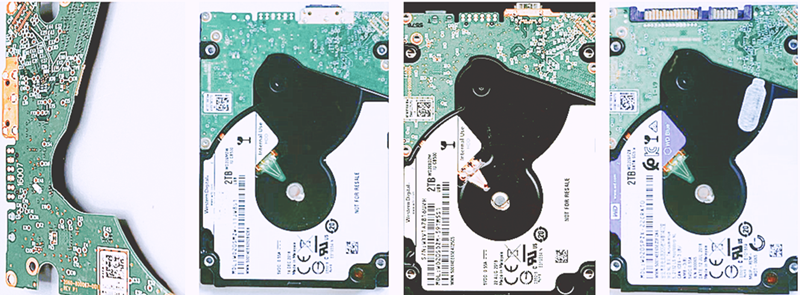
The WD SMR hard drives with PCB numbers 2060-800065, 2060-800067 and 2060-810003 belong to WD Charger family. Slow firmware issue, all sectors zero issue, HDD ID undetected issue, etc are the common hdd failures of the Charger family HDDs, the Charger family HDDs have both SED lock and MCU lock and the common models for these Charger families are as below:

2060-800067-001:

WD20SMZW-11JW8S0
WD20SMZW-11JW8S1
WD20SMZW-11YFCS0
WD20SMZW-34JW8S0
WD20SMZW-34JW8S1
WD20SMZW-59JW8S1
WD20SMZW-59YFCS0
WD20SMZW-59YFCS1
WD20SMRW-59YNDS0
WD20SDZW-11Z3CS0

WD20SDRW-11VUUS0
WD20SDRW-34VUUS0

WD15SMZW-11YFCS0
WD15SMRW-11YNDS0

2060-800065-002:

WD20SPZX-08UA7T0
WD20SPZX-11CRAT0
WD20SPZX-22CRAT0
WD20SPZX-21UA7T0
WD20SPZX-75UA7T1

2060-810003-001:

WD20SDZM-59TM5S1
WD20SMZM-59H3FS1

To repair and recover lost data from WD SMR Charger hard drives, users need to have the following hdd repair tool and data recovery equipment:

HDD ROM Chip Pin Reader
DFL-WD HDD Repair Tool
DFL-DDP Data Recovery Equipment

WD Charger 800065 800067 810003 HDD Head Replacement Tool

WD SMR Charger HDD Repair and Data Recovery Steps:
DFL-URE AND HDD ROM CHIP PIN READER HELP WITH EASIER WD SMR HDD FIRMWARE UNLOCK


Helpful links:
2060-800067 Data Unlock SATA Connector
WD 2060-800065 HDD Firmware Unlock SATA PCB for WD USB PCB 2060-800067 and 810003
2060-810003 Data Unlock SATA Connector


Any question is welcome to sales@dolphindatalab.com or add Dolphin Skype ID: dolphin.data.lab
This video will introduce the physical components included in the DFL-SRP USB3.0 data recovery equipment package. New users can learn clearly how the data recovery hardware looks like and then have a clearer image of this tool.

Here is the video:

To make all data recovery tools and firmware repair tools powerful enough with latest technologies is one side, but to make all tools easier to use is another thing. One of Dolphin team’s biggest targets is to make all users use the tools more easily.

Dolphin team always manage to make all functions work more automatically and within all Dolphin tools, users can find many fast solutions by buttons, that is to say, users just need to simply click one button and can fix some common firmware damage. Read more

Dolphin Data Lab is now releasing new version of of the top-rated USB3.0 data recovery equipment-DFL-DDP USB3.0 data recovery tool.

A lot of powerful and useful data recovery features have been added and the software codes, interface codes and hardware controlling codes have been tremendously improved to handle faulty hard drives for maximizing users’ success rate. Read more

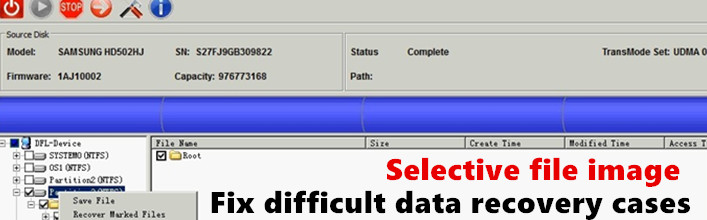
File image is often used when the patient hard drive is not working stably or the drives have a lot of bad sectors or users have just performed head swap and the partitions and folders can be listed.

If you go to extract the files, the program may hang or it takes a long time for soft reset or hard reset or even power reset. At this time, you may use file image and it generates usually better result. Read more

This is one case study offered by one of Dolphin users in BANGLADESH-Mr. Shahi and great thanks to him who is using Dolphin data recovery tools with success and is willing to share his experience.

It was a case MICRON 128GB RealSSD C400.

When the ssd was Received, It was not detecting at all, the client tried in 3/4 shops earlier but none of them were able to do anything on it because it was not detecting at all. Read more

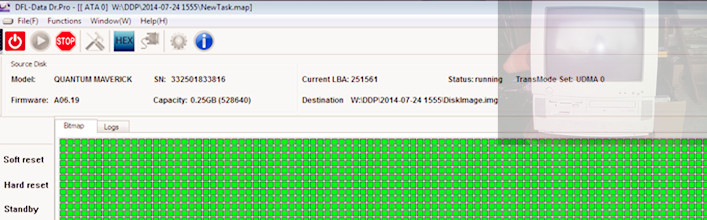
This is one successful case study offered by our France reseller-A.G.D.I data recovery France and many thanks to the chief data recovery engineer-William Simon.

The patient hdd is one very old Quantum hard drive with capacity of 0.25GB from one old pc. Read more

Dolphin Data Lab has optimized the DFL-DDP USB3.0 data recovery equipment further and now is releasing the latest version-V1.41.

This new version is further software optimization with the following new changes:

1, Optimize the process to get the tool activated;

2, Optimize the ROM read of Seagate 7200.10;

3, Optimize the performance within Windows 8 OS (disable the digital signature to install the tool) Read more

According to the board discussion of Dolphin Data Lab, we have decided to raise prices of DFL-DDP USB3.0 data recovery equipment and DFL-DE by 10% in two months. That’s to say from November 11th, 2013, the prices of above two mentioned tools will be 10% higher than the current prices. And at the same time, the prices of the data recovery start-up suite and grow-up suite will be raised too.

DFL-DDP and DFL-DE were created and released with more reasonable design, more powerful functions and more professional support than similar data recovery tools but they have been sold to data recovery engineers at lower prices. Read more